Posts

Writing Unit Tests to test JMS Queue listener code with ActiveMQ

During my GSoC project for OpenNMS i did some work with JMS and wanted to write test classes to make sure that my code was working well. In this article i will try to explain how you can use ActiveMQ to write test cases for your JMS code. This is very handy when your code has a part that listens to a JMS queue. Apache ActiveMQ  Apache ActiveMQ is a extremely popular and very powerful open source messaging and Integration Patterns server. You can check it out here . The part we will be using to run our test classes is the embedded broker that is provided by ActiveMQ. This allows you to create a temporary broker for test purposes to create a JMS queue in our case. If you want to learn more about the embedded broker check out this article . The easiet way to create a embedded broker is through the following code line. This will automatically create a embedded broker. ConnectionFactory connectionFactory = new ActiveMQConnectionFactory("vm://localhost?broker.pe...
Setting up a ZooKeeper Quorum on Amazon EC2 with Exhibitor

Image
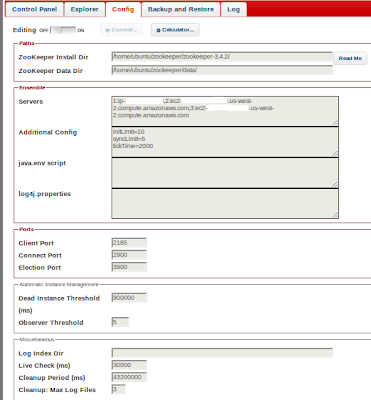
Hi in this post i will try to explain step by step how to set up a ZooKeeper Quorum in Amazon EC2 with the help of Exhibitor. This was done as a part of my final year project so i thought i should share this because it might be helpful to others. I assume that you know about ZooKeeper otherwise you want be reading this article right. anyway if you want to learn about ZooKeeper you can check out the ZooKeeper home page  here . Exhibitor So i will first introduce you to Exhibitor its actually a supervisory system that is built using java technology to monitor and supervise ZooKeeper. It provides some cool features that will help you manage your ZooKeeper instances. You can download Exhibitor here . And if you want to learn more about Exhibitor take a look at there wiki page here . Exhibitor allows you to configure ZooKeeper instances through a very clean web interface. the config panel will look like this. As you can see you can def...

Installing sun-java-6 with apt-get in Linux

Recently i ran into some trouble trying to install sun-java-6 into a Linux server because newer Ubuntu versions do not provide sun-java-6 packages. After some digging i was able to find a solution. You can get it working by adding new sources into apt-get sources.  There are two ways to get it done easily 1. by running add-apt-repository command sudo add-apt-repository "deb http://ppa.launchpad.net/ferramroberto/java/ubuntu oneiric main" If you do not have add-apt-repository already installed you can install it by doing sudo apt-get install python-software-properties 2. by directly changing the source list file sudo vim /etc/apt/sources.list Then add the line into the file. deb http://ppa.launchpad.net/ferramroberto/java/ubuntu oneiric main After you have added this line into the sources from any one of the above methods. perform sudo apt-get update Now you should be able to install sun-java-6 without any problem with apt-get install. 

Debugging Zookeeper with eclipse

Image
This will be a very small post but i thought i should post it because the time i wasted trying to do this simple thing. what i wanted to do was to run the Zookeeper JUnit test one by one so i could debug them to understand how the system works by looking at how the test cases run. I use Eclipse as my IDE so i wanted to do this using Eclipse. In Eclipse if there are JUnit test classes in the source code you can run a single test class by opening the class ( the .java ) right click on it and go to Debug As --> JUnit Test and simple run the tests in that test class. I'm also a novice in this area so i am sure i might have made a mistake or two but i couldn't get Debug As ---> JUnit Test to appear when i checkout the project using subeclipse. So this is the way that worked for me. Checkout Zookeeper Just checkout Zookeeper from svn using the following command. svn checkout http://svn.apache.org/repos/asf/zookeeper/trunk/ Build Eclipse project files Then go to ...

Creating a Group Chat bot with Google App Engine

Hi in this post i will try to explain how to develop a chat bot for gmail actually this will work with any chat application that supports XMPP. Here i will explain how to develop a group chat application that can be used to chat with a group of people. I know you must be wondering why i would go through the trouble to make and app when gmail already supports group chats. Well the problem was that since our final year project was a 4 member group project we had a lot of online discussions but whenever someone would get disconnected they will loose the messages sent while they were offline and someone will have add that person back into the group. so one of my friends suggested me to write a app to solve this because i had written a small chat app before. Lets get started. What is Google App Engine I will assume that you are a bit familiar with Google App Engine. Well if you are not please take a look here  to get an general understanding you only need the ...

Creating a JSON client for AXIS2

Image
This post will try to explain how to develop a sample for Axis2 that uses the JSON module in Axis2. Before you read this blog post read this article to get a understanding about Axis2 JSON module   Creating the folder structure Before we start to do anything lets create the folder structure that will be needed to create the sample. For this sample we will create a folder structure simmilar to the structure given below The resources folder will contain the axis2.xml and the Java code will be added in to src/samples/googleservices/JSONSearch. We will look into each part separately. Before we start working on the sample there are a few simple things that we have to do. Since we will be using the Yahoo Boss API to retrive the search results in JSON format, we need to acquire a API-Key that is needed when using the Boss API. You can create a Yahoo Boss API-Key here , this should not take more than 5 minutes if you already have a Yahoo account. Now that we have a Yahoo Boss ...

Full featured JIRA Issue Tracking Gadget

Image
During my internship at WSO2 I created a JIRA issue tracking gadget as a small project. This is flexible gadget made according to the Google gadgets API so it works on any gadget container that supports Google gadgets API such as iGoogle, orkut, WSO2 Gadget Server, etc. In my previous post i explained the data retrieval method I used to gather data for the gadget. Features Allows the user to specify any company or organisation he/she wants to track the JIRA issues. Displays the most important data and provides a link for additional information. Includes a search tab that provides all the search options provided by the JIRA dashboard The user can specify the URL of the organisation or company he/she wants to track. Lets say you want to track the Issues of apache.org you have to set "https://issues.apache.org" as the URL likewise the user can specify any JIRA URL that needs to be tracked. The interface is created using jQuery UI...