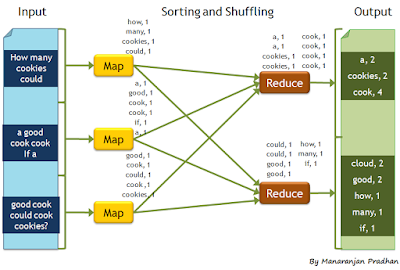
In this post we will look at how to create and run a word count program in Apache Hadoop. In order to make it easy for a beginner we will cover most of the setup steps as well. Please note that this blog entry is for Linux based environment. I am running Ubuntu 14.04 LTS on my machine. For windows users steps might be a little different, information regarding running Hadoop on Windows is available at Build and Install Hadoop 2.x or newer on Windows . Prerequisites 1. Need to have Java installed (preferabally a newer java version such as 1.7 or 1.8 ) Download Oracle JDK 8 from http://www.oracle.com/technetwork/java/javase/downloads/index.html Extract the archive to a folder named jdk1.8.0 Set the following environment variables. (You can set the variables in the .bashrc file) JAVA_HOME= PATH=$JAVA_HOME/bin:$PATH export JAVA_HOME PATH 2. SSH, If you do not have ssh installed in your machine use the following command to install ssh and rsync which is also ne...


Comments
Post a Comment